Ever wanted to create a new online store but don't want to set it up from scratch? Now you can migrate your existing third-party store data to your Invotide store or migrate your Invotide store data to your third-party store using our new store migration service. Invotide Store Migration Service is designed to help you migrate data seamlessly between third-party eCommerce platforms (shopping carts) your existing stores run on (Woocommerce or Shopify) and your Invotide store. More specifically, our service—powered by automated migration tools—allows you to transfer products, customers, orders, blogs, and other data between a Custom Cart (third-party platform) and your Invotide store. 
This is not only an automated solution but also a full service in which your migration process is handled by our experts, step by step. Our team will support you 24/7 during the migration and fix any possible issues until you are fully satisfied with the final result.
Benefits Of Our Migration Package
When you opt in to use our migration service, we provide flexible, robust migration tool to ensure you enjoy a seamless migration process.
No Downtime - The migration does not affect the speed and performance of your stores. It will function as normal during migration.
No Tech Skill Required - It takes just a few clicks to get your store migration done by our team. No technical skills needed. No installation required.
Professional Support - You will get 1:1 tech support during store migration, until you are happy with the results. We provide 24/7/365 migration support.
SEO Rankings Preservation - The migration tool is designed to keep existing URLs and meta data on the target store to ensure your site doesn't drop SEO ranking.
Supported Third-Party Platforms
Invotide migration tool currently supports all popular third-party eCommerce platforms, we can also accommodate custom platforms upon request. Our migration tool is designed to support your migration between Invotide platform and any of the third-party platforms listed below.
- 3DCart
- AbanteCart
- AbleCommerce
- Adobe Business Catalyst
- Adobe Commerce
- Amazon Webstore
- AmeriCommerce
- Bagisto
- BigCommerce
- Bluepark
- Clover
- CommerceHQ
- CS-Cart
- CSV
- CubeCart
- Drupal
- Easy Digital Downloads
- EasyStore
- eBay
- Ecwid
- EShop
- GoDaddy
- HikaShop
- Interspire J
- 2Store
- Jigoshop
- JooCart
- Joomla
- JoomShopping
- Jumpseller
- Lightspeed
- LiteCart
- Magento
- Maropost
- MijoShop
- Miva Merchant
- Neto
- nopCommerce
- OpenCart
- osCmax
- OsCommerce
- Phoca Cart
- Pinnacle Cart
- Plentymarkets
- PrestaShop
- QuickBooks
- Quickbutik
- Salesforce
- Shift4Shop
- ShopBase
- Shopify
- Shopp
- Shop-Script
- Shopware
- ShopWired
- Square
- Squarespace
- Storeden
- Storenvy
- Sunshop
- Sylius
- Ubercart
- Upgates
- Vend
- VirtueMart
- Volusion
- VTEX
- Weebly
- Wix
- WiziShop
- WooCommerce
- WordPress
- WP EasyCart
- WP eCommerce
- X-Cart
- xt-Commerce
- Zen Cart
How to Order for Invotide Store Migration Package — Step by Step
When setting up a new Invotide store, you will be able to order the store migration package once you login to your store admin panel the first time. If you already own an existing Invotide store, the data migration process is easy to follow. Here is how it works below:
Step 1: Submit Your Request
Login to your Invotide store admin panel, choose "All Addon Services” menu, proceed to select the "Store Migration" from the list as shown in the screenshot below. Click the submit ticket button, provide the necessary credentials for your third-party stores, including admin access, FTP/SSH/cPanel access (for open-source carts), and detailed migration requirements.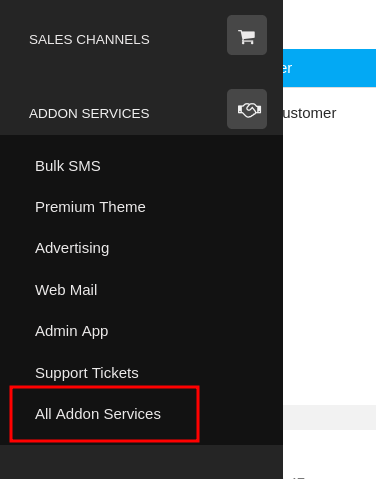
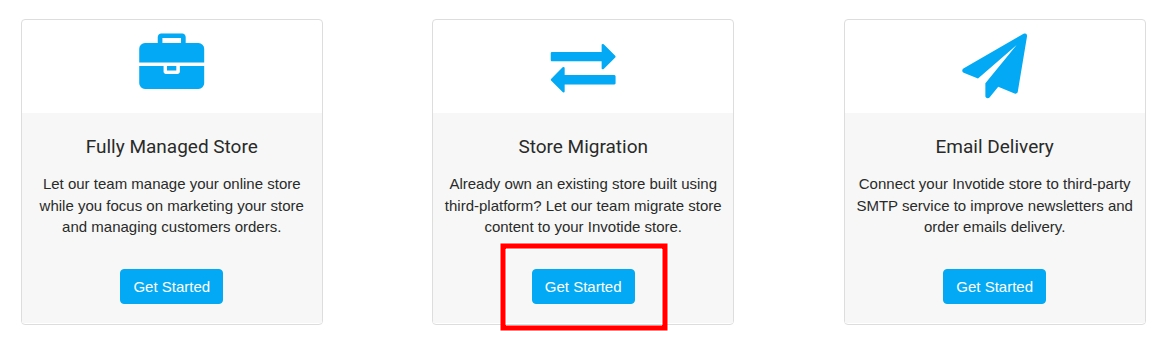
Step 2: Migration Execution
We will contact you and once you make payment, our migration team will receive your request, customize the migration tool according to your specifications, and manage the entire migration process on your behalf.
Step 3: Finalize the Migration
Once the store migration is complete, our team will review the data between our third-party store and your Invotide Store thoroughly. We will resolve any issues until you are fully satisfied with the outcome.
Step 4: Transfer Your Domain
When your updated Store is ready to go live, our team will assist you in adjusting the URL settings and transferring the domain. Enjoy your newly migrated store!
That's it!
Have questions?
If you are ready to migrate your existing store data, don’t hesitate to contact us today. We are looking forward to working with you and helping you achieve your online selling goals.
Saturday, June 27, 2026